Skip to content
New
Postly CRM: Capture leads from social conversations.Explore CRM
The complete social campaign platform

Create. Distribute. Engage. Convert.

Postly brings your AI-powered social media scheduler, campaign distribution network, customer conversations and CRM, and branded Bio Pages into one connected platform.

AI-powered publishing
Multi-channel distribution
API + MCP ready
P

Postly campaign command center

Create once. Distribute, engage, and convert.

All systems connected
Plan + publish

AI Social Scheduler

Create, plan, approve, schedule, and automate platform-ready content with AI.

Every destination

Campaign Distribution

Send one campaign across social, messaging, email, blogs, and Bio Pages.

Engage + convert

Postly CRM

Turn DMs, comments, and reviews into organized, contactable opportunities.

Own the destination

Bio Pages

Build branded destinations that connect every campaign, offer, and link.

One connected growth loop

Create → Distribute → Engage → Convert

See what matters most for your work
The complete client campaign platform for agencies

Run every client’s social growth operation from one place.

Give every client a secure workspace to create with AI, distribute campaigns across channels, manage conversations and leads in Postly CRM, launch branded Bio Pages, and report results without stitching together separate tools.

1

Operate every client separately

Use secure workspaces, connection links, roles, approvals, notes, calendars, and reporting without asking clients to share passwords.

2

Create and distribute at agency scale

Build with AI, schedule in bulk, automate evergreen campaigns, and publish across social, messaging, email, blogs, and Bio Pages.

3

Turn engagement into client value

Manage supported DMs, comments, and reviews in Postly CRM, capture contact details with consent, and export qualified opportunities.

4

Launch conversion-ready destinations

Create branded Bio Pages for clients, campaigns, offers, and every link you need to measure and manage.

Review official platform posting limits
PClient command center
Agency

Northstar Agency

Client command center

12 client workspaces
N

Northstar

4 channels

Approved
O

Orchid Labs

7 channels

Review
U

Urban Fox

5 channels

Scheduled

Approval queue

6 items across 3 clients

Client campaign

Launch week, ready for approval.

Drafts

18

Review

6

Scheduled

42

Open approval queue

Northstar Agency

A workflow that matches how you work

Connected
1

Separate

One workspace per client

2

Review

Approvals and notes

3

Publish

Bulk and recurring

4

Report

Show visible results

Distribution channels

Publish everywhere your audience already is.

Connect social, messaging, blog, email, and Bio Page destinations from one publishing workspace.

View channel pricing
XPosts, long-form posts, threads, replies, media, and advanced publishing automation.InstagramFeed posts, carousels, Reels, Stories, tagging, collaborators, first comments, and mobile audio reminders.FacebookFacebook Page feed posts, carousels, Reels, Stories, first comments, and mobile profile sharing.YouTubeVideos and Shorts with titles, descriptions, tags, thumbnails, first comments, and audience controls.LinkedInProfile and Page posts, articles, documents, mentions, CTAs, targeting, UTMs, and first comments.TikTokFeed videos and Stories with privacy, comments, Duet, Stitch, and disclosure controls.PinterestImage, video, link, and multi-page Idea Pins with destination URLs and tracking.Google Business ProfileLocal updates, events, offers, and product posts with calls to action and links.BlueskyPosts and threads with media, tags, language declarations, and content labels.ThreadsSingle posts and multi-post threads with mentions, reply controls, and quote controls.TelegramChannel and group messages with pins, silent delivery, spoilers, protection, topics, and buttons.WhatsAppWhatsApp Business template campaigns for opted-in recipients and contact lists.WordPressSEO-ready WordPress posts with taxonomy, featured media, metadata, schema, and Gutenberg controls.ActiveCampaignEmail campaign support for ActiveCampaignBeehiivEmail campaign support for BeehiivBrevoEmail campaign support for BrevoKitEmail campaign support for KitMailchimpEmail campaign support for MailchimpBio PagesTurn every post into a measurable, click-capturing destination that compounds results.
Auto Post automation

Automate more of your publishing operation.

Turn prompts, videos, products, feeds, blog URLs, and documents into repeatable social and WordPress workflows. Review the first output, choose the publishing cycle, and let Auto Post keep the campaign moving.

1

AI Prompt

Brief to campaign

2

YouTube

Video to posts or blog

3

Ecommerce

Products to campaigns

4

RSS Feed

New item to publishing

5

Blog URL

Article repurposing

6

Documents

CSV, Word, PDF, TXT & JSON

PAuto Post Setup
Automation
To SocialTo Blog
Step 1 of 5

Workflow Template

Choose what Auto Post should watch, transform, and publish on every run.

AI Prompt
Generate new social or WordPress content from a reusable brief.
YouTube Video
Turn a public video into social posts or a WordPress article.
Ecommerce Store
Create campaigns from public products, stores, and readable catalog pages.
RSS Feed
Watch a public RSS or Atom feed and publish when new content appears.
Blog URL
Repurpose a public article into new social or WordPress content.
Document
Create from CSV, Word, PDF, TXT, JSON, and other supported files.

Automate more publishing sources over time

Social, blogs, feeds, products, videos, prompts, and documents.

Build workflow
The social media essentials

The workflows that drive daily social media work.

Plan, automate, publish at scale, engage, and measure without turning your workspace into a feature maze.

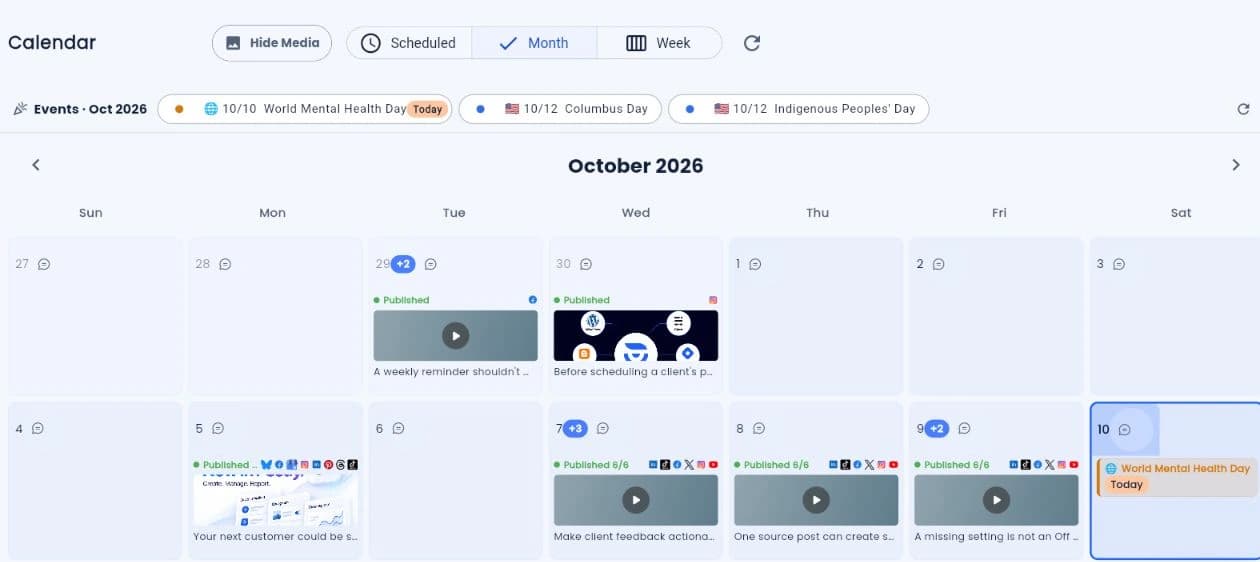
A calendar your team will actually use

See the month, pick the right time, and publish with confidence.

Bring every channel into one visual calendar, preview each post, and use global best-time recommendations to schedule the next move.

Month and week calendar views
Platform-aware previews and settings
Global best-time recommendations
Explore plan & schedule
PCalendar
Pro

July 2026

See the whole month at a glance

Hide mediaMonthWeek
Sun
Mon
Tue
Wed
Thu
Fri
Sat
1
2
3
4
5+2
6
7
8

Published

Best social media

9
10+3

Published

Launch teaser

11
12
13
14
15+4

Published

Customer story

16
17

Draft

Recurring tips

18
19
20+1
21

Scheduled

Product update

22
23

Scheduled

Behind the scenes

24
25+2
26
27
28

Recommended today: 7:15 AM

Based on your global performance history

Use time
Customer conversations & CRM

Turn every client conversation into an organized, contactable opportunity.

Manage supported DMs, comments, and reviews across client accounts, collect missing email or phone details with consent, and send qualified contacts into each client’s sales workflow.

Client-aware conversation filters
Contact capture without a second assignment system
Export-ready leads with source context
PPostly CRM
CRM

Turn conversations into contactable leads

DMs, comments, reviews, contact capture, exports, and integrations

All platformsContact statusConnect account

Quick views

All conversations128
DMs48
Comments32
Reviews11
Potential leads24
Contact needed18
Contactable37

Platforms

WAFBIGXBSinG

128 conversations

Newest
WA

Jane Smith

2m

I’d like to know more about your Pro plan.

Potential leadPhone capturedEmail needed
IG

Orbit Studio

14m

Do you offer monthly plans?

CommentContact requested
FB

Michael Grant

32m

Can you send me more details?

DMEmail captured
G

Sarah K.

2h

Excellent service and very responsive team!

ReviewHandled
ConversationContactHistory
Hi, I’d like to know more about your pricing for the Pro plan.
I’d be happy to share more details with you.

Contact capture

Phone from WhatsAppCaptured
EmailMissing

Automatic email capture

What email address should we use to send the details and follow up?

Type a message...

Contact

Name

Jane Smith

Phone

Captured

Email

Missing

Request emailTeam notesExport leadMark handled
Create faster. Extend further.

A familiar scheduler on the surface. A powerful publishing engine underneath.

Use the dashboard for everyday social media work. Add AI Studio for content production, or use the API and MCP when software and agents need to execute.

Create the complete campaign package

Generate the words, visuals, and videos—then move straight into publishing.

Use your brand context to create captions, images, video, first comments, newsletter copy, and reusable campaign assets without leaving the workflow.

Text, image, and video generation
Brand Kit guidance
Draft, review, schedule, or automate
Explore AI Studio
PAI Studio
Pro

Campaign brief

Generate a complete asset package

Create a confident product launch campaign. Generate platform-specific captions, a hero image, a short promo video, and a newsletter introduction.
TextImageVideoBrand Kit
Generate campaign

Generated asset package

Ready
Hero image

Launch brighter

One campaign. Every social channel.

Newsletter intro

Facebook caption

LinkedIn post

First comment

Built for the channels customers already trust

One workflow. The platforms your audience checks every day.

LinkedInYouTubeInstagramFacebookXGoogleTikTokWordPress
Simple, scalable pricing

Start with five. Scale without switching plans.

One Pro plan gives your team the scheduling and management system it needs. Add channels as you grow and unlock lower rates automatically.

  • Unlimited scheduled posts
  • Unlimited team members and workspaces
  • AI-assisted content creation
  • Calendar, approvals, analytics, and automation

Pro calculator

Five channels minimum

Estimated Pro total

$16/mo

$3.20 effective per channel

billed yearly

Progressive pricing

Each rate applies only inside its band.

Earlier channels keep their rate

1–10

$3.20/ch

11–100

$1.60/ch

101+

$0.80/ch

Channels 1–105 × $3.20 = $16
Monthly equivalent$16/mo
Quick answers

Everything you need to start scheduling with Postly.

Move from scattered social media tasks to one clear content management workflow—without adding process overhead.

What counts as a channel?

A channel is one connected social profile, page, location, account, or publishing destination. Pro starts with five, so you can manage a real multi-channel presence from day one.

Can I add more channels later?

Yes. Start with five and scale whenever you need to. Your effective per-channel rate drops at 11 and 101 channels.

Can my team schedule and manage content together?

Yes. Pro includes shared workspaces and unlimited team members, so planning, approvals, publishing, and performance review stay in one workflow.

Does this replace separate scheduling tools?

For most teams, yes. You can plan content, create with AI, schedule, publish, manage profiles, and track results without stitching together separate tools.

Is there a free trial?

Yes. You can explore the workflow before committing and choose monthly or yearly billing when you are ready.

Your social media operation, simplified

Schedule more. Repeat less. Grow with a system.

Give every client a secure workspace to create with AI, distribute campaigns across channels, manage conversations and leads in Postly CRM, launch branded Bio Pages, and report results without stitching together separate tools. Start with the scheduler today, then add automation, AI, API, and agents as your operation grows.